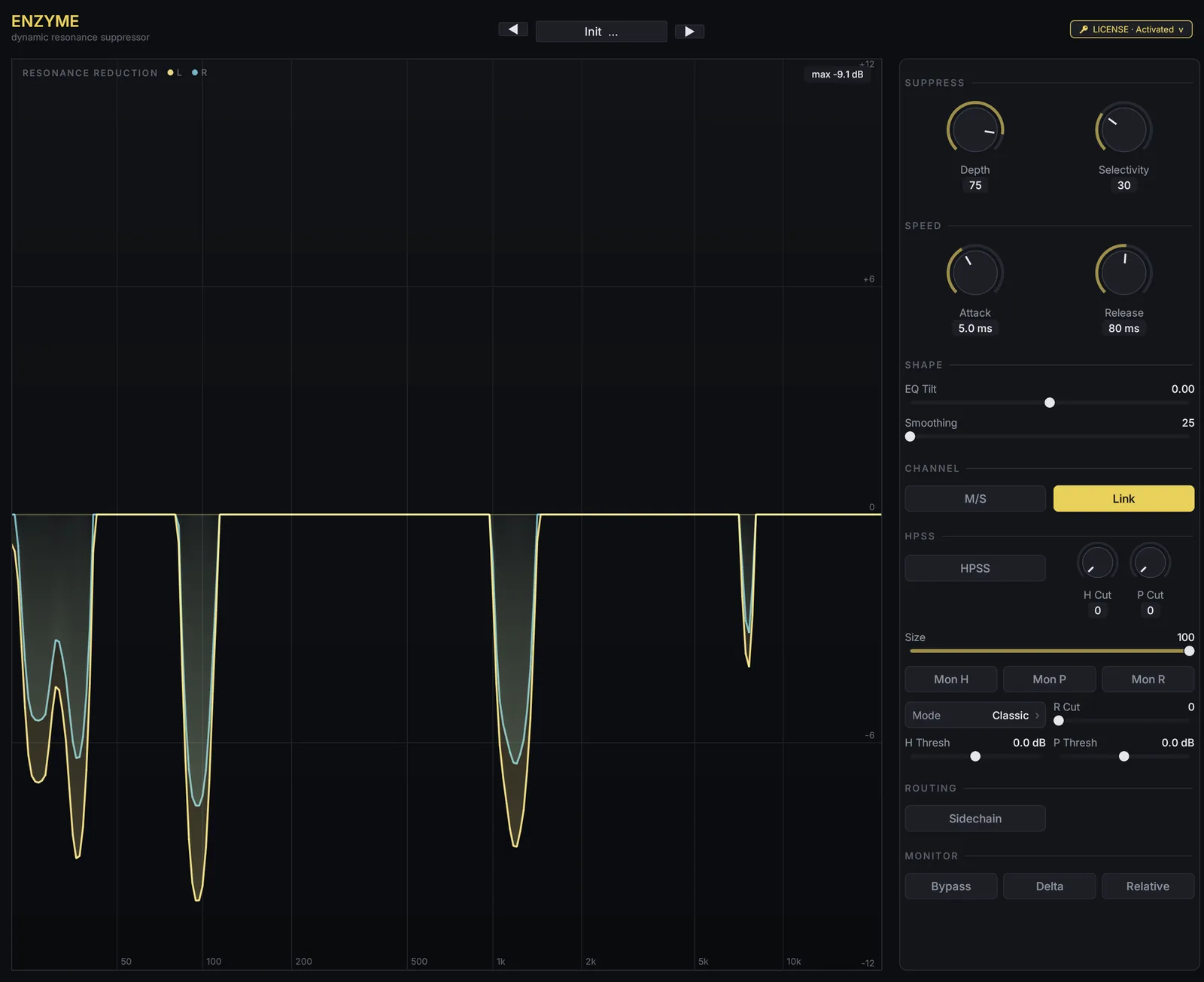
Finds the narrow peaks that stick out above their
own surroundings — room resonance, snare ring, a boxy note on an acoustic
guitar — and pulls them down
per frequency bin, per frame.
A static notch would thin out everything else at that frequency. This doesn't.
Full documentation: ENZYME user manual — every control, the H/P/R stage, preset workflow recipes and troubleshooting.
Nothing is boosted. Every control either reduces level or shapes how much
reduction happens.
What does ENZYME do?
ENZYME is a dynamic resonance suppressor. It finds narrow peaks that stick out above their surroundings, such as room resonance, snare ring or a boxy note, and reduces them per frequency bin and per frame, so the rest of that frequency is left alone. VST3, CLAP and AUv2, 46 ms latency, 14-day free trial.
Hear it on real tracks
The same 15-second passage from each song, played dry and then through five presets — Stereo Link
plus independent L/R, M/S and H/P processing. Every segment is loudness-matched to roughly −18 LUFS,
so what changes is the resonance, not the level.
When you'd reach for it
The problem ENZYME is built for is the one where you can hear exactly which
frequency is wrong, but notching it costs you everything else that lives there.
Rooms that ring
A vocal or acoustic take carrying the low-mid signature of the room it was recorded in. The resonance only blooms on certain notes; ENZYME only acts on those.
Snare ring
The sympathetic tone that rings on after the hit. Percussive-only cut in the HPSS stage lets you reach it without dulling the transient.
Boxy guitar notes
One or two notes on the neck that jump forward. Per-frame detection means the rest of the performance keeps its body.
Sibilance that only bites sometimes
Narrow HF peaks on specific words. A broadband de-esser would dull the whole take; ENZYME follows the peak.
Harsh mix bus
Accumulated peaks nobody put there on purpose. Low Depth with high Selectivity across the bus takes the edge off without a general darkening.
Resonant synth and sampled material
Filter self-oscillation and sampler artefacts sitting proud of the spectrum. The detector doesn't care what made the peak.
Every control on one panel
The reduction curve under the spectrum is the direct readout of what ENZYME is
deciding right now. When you're learning a control, watch that — not the spectrum.
Control
Range
What it does
Depth
0 – 100%
How much attenuation each unit of excess buys. 0 is transparent, 100 is maximum suppression.
Selectivity
0 – 100%
Width of the kernel that estimates the local baseline. High values catch only sharp peaks; low values also treat broad humps as resonance.
Attack / Release
1-pole
How fast the gain moves into and out of a cut. Defaults are 5 ms and 80 ms. Warbling on sustained notes means Release is too short.
Smoothing
0 – 100%
Smooths the reduction mask along the frequency axis. Higher values trade a little precision for less ringing.
EQ Tilt
±
Biases the detector towards the low or high end, so one region gets worked harder than the other.
Relative
on / off
Reads the threshold as a linear ratio above the baseline instead of an absolute level — the same spectral protrusion gets the same treatment regardless of input level.
M/S · Link
on / off
Detect in mid/side instead of left/right, and choose whether the two channels share one gain decision or move independently.
Sidechain
stereo
Drive detection from another source while the gain is applied to this one.
Delta · Bypass
monitor
Delta plays only what is being removed — the fastest way to catch over-processing. Bypass keeps latency compensation intact, so A/B stays phase-aligned.
The second stage: harmonic / percussive / residual
Optional, and the part no ordinary dynamic EQ gives you. ENZYME separates the signal
into three components and lets you attenuate each one on its own.
H Cut · P Cut · R Cut
Independent attenuation for the harmonic (sustained, pitched), percussive (transient, broadband) and residual (everything neither) components.
Size
Median kernel width from 7 to 31 bins. Wider separation is cleaner but costs more CPU — the full range stays under 3.3% of the hop budget.
Classic / Coupled / Advanced
Three mask formulations. Classic is the plain median split; Coupled and Advanced trade a little more CPU for tighter component boundaries.
Mon H / Mon P / Mon R
Solo any one component to hear exactly what the separation is doing before you commit to a cut. If the output sounds like one isolated element, a Mon button is still latched.
This is the same median-filter HPSS that backs Intrect's separation work, running
causally inside a real-time plug-in. Combined with per-bin suppression it means you
can take the ring off a snare without touching the stick, or pull a resonance out of
a sustained note while the transients around it stay intact.
Built to sit on a busy session
Native AUv2 — no wrapper
Logic and GarageBand load a real Audio Unit component, not a CLAP wrapped at runtime. The wrapper approach lost GUI input events under Logic's out-of-process hosting; this doesn't.
1.2–3.3% of the frame budget
71.5 µs per frame with HPSS off, 191 µs with the widest kernel and the most expensive mask — measured over 800 frames at 44.1 kHz on Apple Silicon.
No allocation on the audio thread
The DSP hot path adds no allocation and takes no locks. Buffers are sized once at activation.
Phase-aligned monitoring
Bypass, Delta and the HPSS state changes all keep the reported latency and the dry/wet alignment. Switching while playing doesn't shift the signal.
Resizable Metal editor
A wgpu/Metal GUI on a 1280×1044 canvas that scales to your display, with the spectrum and reduction curve drawn live.
Preset browser with import / export
Factory presets install alongside your own. Load, save, rename, delete, import and export from the header, with a category filter.
How it works
Causal — no lookahead beyond the analysis window — so live monitoring works.
The dry path is delayed to match, which is what keeps Bypass and Delta honest.
input ──┬─ dry delay (2047 samples) ─────────────────────┐
      │                                                  │
      └─ STFT (2048-pt, 87.5% overlap)                     │
           → baseline estimate (box mean, power domain)     │
           → excess over baseline → gain per bin           │
           → decision-directed smoothing                    │
           → 1-pole attack / release                        │
           → HPSS H/P/R de-mix (optional)                  │
           → apply gain → IFFT → overlap-add ──────────────┴→ output
The baseline is a running power-domain mean of the bins around each bin, so "peak"
means above its own neighbourhood rather than above a fixed threshold. The
decision-directed step feeds the previous frame's estimate back in
(Ephraim & Malah, 1984), which is what stops the musical-noise fluttering that
naive spectral subtraction produces. Structural latency is
N_FFT − 1 = 2047 samples — about 46 ms at 44.1 kHz, 43 ms at 48 kHz.
Measured cost
Apple Silicon release build, 44.1 kHz, median over 800 frames. "Budget" is the wall
clock available per 256-sample hop — what's left is yours.
Configuration
Median per frame
Share of hop budget
HPSS off
71.5 µs
1.2%
Classic HPSS, kernel 31
169.6 µs
2.9%
Coupled / Advanced, kernel 31
190.9 – 191.5 µs
3.3%
Kernel 31 is the widest separation available, so the last row is the worst case.
Measured 2026-07-27 on the 0.2.x DSP.
System requirements
Requirement
Minimum
Recommended
macOS
Universal Binary — Apple Silicon (arm64) + Intel (x86_64) in one .pkg · macOS 11 (Big Sur) or later. Signed and notarized, so Gatekeeper lets it through without a right-click workaround.
Formats
AUv2 (.component) · VST3 · CLAP — all three installed by the same package
2047 samples, reported for host delay compensation. PDC must be enabled in the host.
Sample rate
Any rate the host provides.
Channels
Stereo in, stereo out. Optional stereo sidechain.
Windows
VST3 + CLAP, 64-bit · Windows 10 or later. Requires the Microsoft Visual C++ 2015–2022 redistributable, which the installer adds if missing. No Audio Unit — that format is macOS-only. The Windows build is not code-signed yet, so SmartScreen shows a warning on first run — choose More info → Run anyway, or verify the published SHA-256 before installing.
Linux
Roadmap.
FAQ
How is this different from a static EQ notch?
A notch is always on. ENZYME decides per frequency bin and per frame, so it only pulls a peak down while that peak is actually there. Everything else living at the same frequency passes untouched.
Does it work in Logic Pro?
Yes. ENZYME ships a native AUv2 component alongside VST3 and CLAP, so Logic, GarageBand and any other Audio Unit host load it directly. If it doesn't appear after installing, restart Logic — it caches its plug-in list — and rescan from the Plug-In Manager if needed.
Nothing appears to happen.
Check Depth — at 0% the plug-in is intentionally transparent. Also check that the detector has something to find: material without narrow peaks produces little reduction, which is correct behaviour. Watch the reduction curve rather than the spectrum.
The sound is thin or lifeless.
Too much Depth, or Selectivity too low so broad musical content is being treated as a peak. Raise Selectivity, lower Depth, and verify in Delta — Delta plays only what is being removed.
Fluttering or warbling on sustained notes.
Release is too short, or Smoothing too low. Lengthen Release first.
I hear a short silence every minute.
The plug-in is unlicensed or the trial has expired — it mutes for 500 ms once every 60 seconds until you activate. Check the LICENSE button in the header before hunting for a routing problem.
Timing feels off against other tracks.
ENZYME reports 2047 samples of latency for the host to compensate. If your host's delay compensation is disabled, re-enable it. The dry path used by Bypass and Delta is delayed by the same amount, so those stay phase-aligned.
Output is one isolated component.
A Mon H / Mon P / Mon R button is still latched. Those are monitoring solos for the HPSS stage, not processing modes.
Try it free for 14 days, buy when you're sold
The trial is the full plug-in — every control, every preset, no gaps. It starts
the first time you open the interface and click LICENSE. After 14 days
the plug-in mutes for 500 ms once every 60 seconds until you activate.
Start the 14-day trial
14-day free trial
AUv2, VST3 and CLAP on macOS; VST3 and CLAP on Windows. The trial is tied to the machine, so reinstalling doesn't extend it — but a license key activates it instantly whether you're on day 1 or past day 14.
macOS — Apple Silicon + Intel · Windows — x86_64 · Linux — roadmap
Buy ENZYME
One-time licence
One-time purchase, three machines, free updates within v1.x. The license key arrives by email. Activation needs a network connection once; after that the plug-in works offline.