Intrect / Intrect HPSS / Manual
Intrect HPSS
Real-time harmonic, percussive, and residual component separation for your DAW.
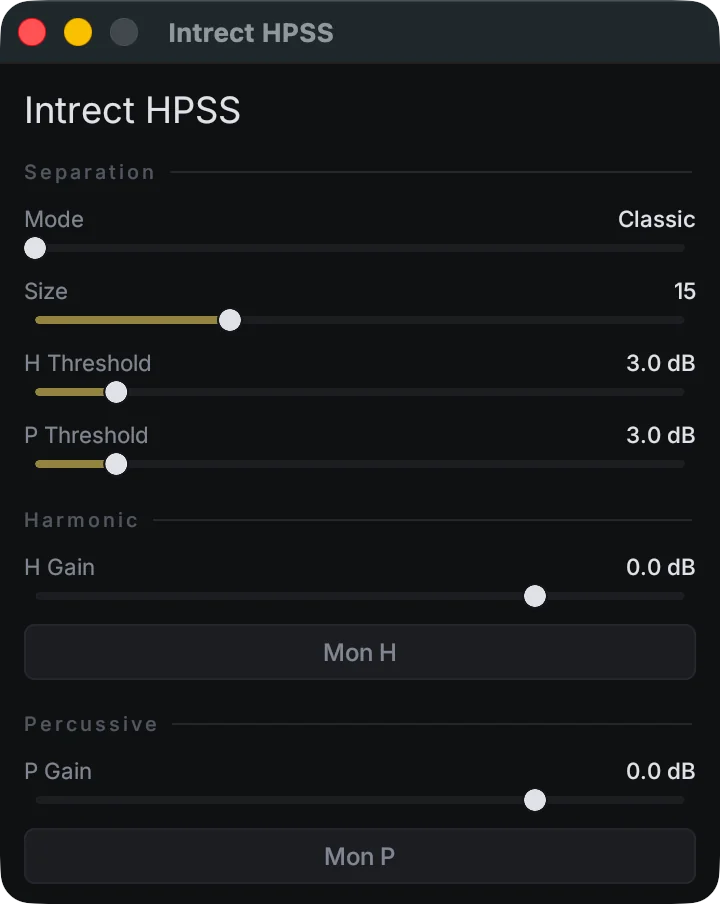
What it does
Intrect HPSS splits incoming audio into harmonic (H), percussive (P), and, in Advanced mode, residual (R) components. It processes audio locally in real time; it does not upload audio or perform source or stem separation.
Use the gain faders to rebalance sustained tones against transients, then use the monitor buttons to audition the component you are changing.
Install and first run
Download the current macOS Universal PKG from the Intrect Product Portal, open it, and follow the installer prompts. It installs VST3, CLAP, and Audio Unit formats for Apple Silicon and Intel Macs.
Restart or rescan your DAW, insert Intrect HPSS on a track or bus, and begin in Classic mode. Keep host plug-in delay compensation enabled.
Separation modes
Soft H/P rebalance
Soft Wiener masks produce a natural harmonic/percussive separation. Residual is not produced in this mode. Start here for gentle changes.
Hard H/P split
A binary threshold assigns each spectral bin to harmonic or percussive output. Use it when you need sharper, more decisive isolation.
Expose residual
Independent H and P thresholds leave energy matching neither threshold in Residual. Use it to control in-between material, texture, noise, or tails.
Controls and workflow
H Gain and P Gain
H Gain controls sustained, tonal material such as vocals, synths, and pitched resonance. P Gain controls transient material such as drums, clicks, and attacks. Make small changes, then compare to bypass.
Mon H and Mon P
Use the monitor buttons to solo a component while you adjust it. If a component sounds incomplete or unnatural, return to Classic mode or reduce the separation strength.
- Start in Classic mode.
- Lower P Gain slightly to soften attack, or lower H Gain to reduce sustained material.
- Use the monitors to confirm the intended component is changing.
- Move to Coupled for a harder split or Advanced for a separate residual component.
Troubleshooting
If the plug-in does not appear, restart the host and run its plug-in scan. If timing feels wrong, check that plug-in delay compensation is enabled. For support, open a ticket from the Intrect account used for the download.
Product details and community feedback on KVR Audio (opens in a new tab)
Want to check a track first? Free AI music detector — no account needed.